
Home»Money»Pay in local currency
Always Pay in Local Currency: The DCC Trap Explained
By  Ignas Simkus|Last updated: 24 July 2026|How we test
Every card terminal abroad eventually asks the question: pay in your home currency or the local one? I have been asked it in more countries than I can count. One button costs you nothing; the other quietly hands the machine’s owner a cut that consumer tests put anywhere from 3 to 12 percent. Here is the whole mechanism in five minutes.
Article Summary
- The rule: when a terminal or ATM offers your home currency, always choose the local one
- What DCC costs: typically 3-8% baked into a worse exchange rate, with consumer studies logging spreads up to 12%
- Who converts better: your own bank or card, every single time
- Where it strikes: ATMs, hotel checkouts, tourist-area shops, taxis and online checkouts
The screen that costs money
Dynamic currency conversion, DCC, is the option a terminal offers to charge your card in its home currency instead of the local one. It is sold as convenience: see the price in euros, know what you will pay. What the screen does not say is who sets the exchange rate for that convenience: the terminal operator, at a rate of their choosing. Independent consumer testing has measured those spreads at 2.6% to 12% over the card-scheme rate, averaging around 5%.
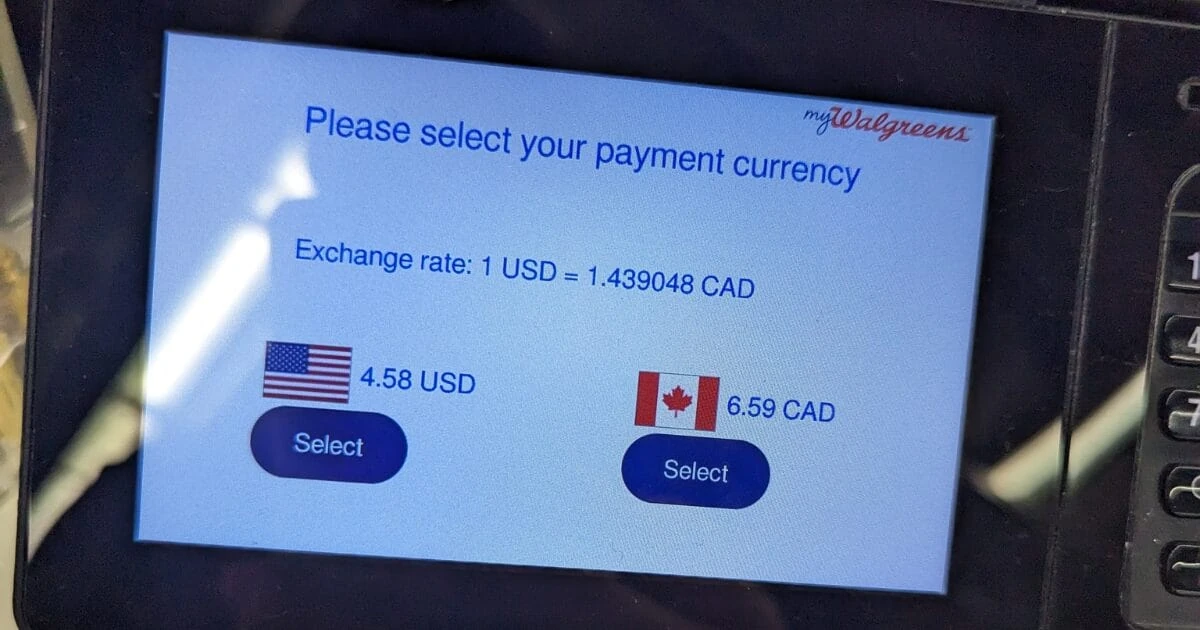
The screen below is the trap in its natural habitat: a real terminal offering $4.58 in local currency or $6.59 converted, the same purchase, with the conversion fee visible for once instead of buried in the rate.
Why your own bank always converts better
Choose local currency and the conversion happens inside the card network at close to the interbank rate, plus whatever your card charges, with a good travel card, nothing. Choose home currency and the conversion happens at the terminal, at a marked-up rate the operator keeps. There is no version of this where the terminal wins for you: the ceiling for DCC is “as good as your bank”, and it never hits the ceiling.
The gap widens if you carry a proper travel card. My own daily card converts at the real mid-market rate, which makes accepting DCC a straight donation. Even a legacy bank card charging 3% abroad usually beats a DCC rate.
Where the trap is set
- ATMs are the biggest one: the withdrawal flow inserts a “continue with conversion?” screen, often with the decline option styled to look like an error.
- Hotel checkouts run it quietly at the desk.
- Tourist-area card terminals often default to it, handed over mid-tap.
- Online checkouts that detect a foreign card sometimes pre-select your home currency at their own rate.
The pattern is identical everywhere: a helpful-looking offer, a worse rate underneath. One quiet exception: quick contactless taps under the local verification limit generally cannot carry DCC at all under Mastercard’s rules, which is one more argument for tapping instead of inserting.
The maths on one real screen
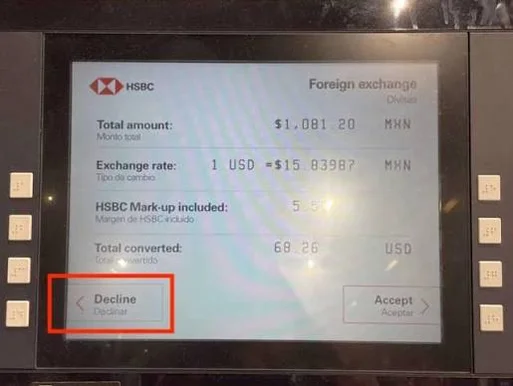
Run the numbers on that HSBC screen and the trap stops being abstract. The machine offered to convert 1,081.20 pesos into $68.26, and printed its own confession in the small type: “Mark-up included: 5.5%”. Without the mark-up, the same pesos were worth roughly $64.70 that day. Pressing the green Accept button would have cost about $3.56 on a single withdrawal, more than most cards’ entire monthly ATM fee, for nothing.
Now scale it. A two-week trip with, say, €1,500 of card payments and cash withdrawals run through DCC at that 5.5% hands the machines about €80. The consumer studies mentioned above logged spreads up to 12%; at that end the same trip donates almost €180. The decline button is the highest-paid button you will press all holiday.
Field notes: the same trap, receipted
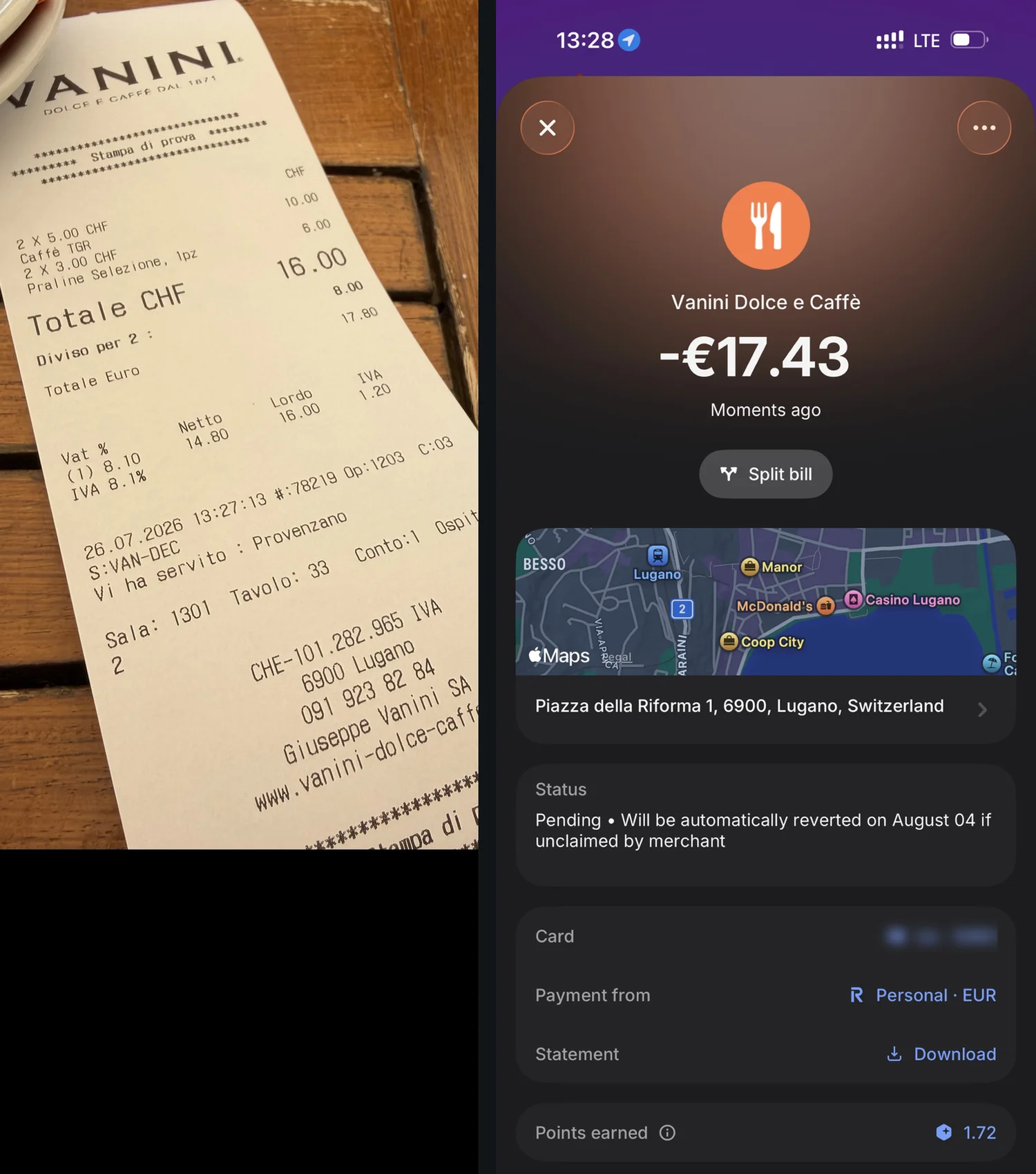
This one is from my own trip, last Sunday in Lugano. Coffee and pralines for two: 16 francs. The receipt helpfully printed a euro conversion, 17.80. I paid in francs and let my card convert instead: 17.43 euro settled, and that includes the card’s own 1% Sunday exchange fee. One button, 2.1% kept, and the receipt admits the whole mechanism in two printed lines.
The two-word script
“Local currency.” That is the entire skill. At a terminal, press the local amount. At an ATM, decline the conversion, the button is variously labelled “without conversion”, “decline”, or hidden behind “more options”. At a hotel desk, say it before they run the card. If a merchant insists the machine cannot do local currency, it can; the operator earns commission on DCC, which is why the conversation happens at all. Card-scheme rules require the choice to be yours: Visa’s DCC rules mandate both amounts and the markup on screen, with a dedicated chargeback code (76) for conversions forced without consent, and Mastercard’s DCC guide requires the offer before you confirm payment. EEA cardholders got an extra layer in EU Regulation 2019/518: currency-conversion charges must be disclosed as a percentage over the European Central Bank’s reference rate, which is why European terminals now show that strange little percentage next to the offer. Read it once and you will never accept again.
Online checkouts run the same play
The web version of DCC skips the terminal and lives in a currency dropdown. Airline sites, hotel booking engines and shops that sniff a foreign card love pre-selecting your home currency, priced at their own rate. The fix is the same two words: switch the checkout back to the merchant’s local currency and let your card convert.
PayPal deserves its own sentence, because its default does the converting for you. Buried in the payment screen is a choice between PayPal’s conversion rate and your card’s; PayPal picks itself unless you tap through and choose the card. If you pay in foreign currencies more than once a year, changing that selection is thirty seconds that keeps paying.
Already pressed the wrong button?
It happens, usually at a tired midnight ATM. Two things are worth knowing. First, the receipt is your evidence: a DCC transaction must show both amounts, the rate and the mark-up, so keep it. Second, if the conversion was applied without offering you a genuine choice, that is disputable: card schemes run dedicated processes for it (Visa’s chargeback reason code 76 exists precisely for unconsented conversions), and your bank’s in-app dispute flow is the door. Be realistic on small sums, banks weigh effort against euros, but forced DCC on a large hotel bill is exactly what the mechanism is for.
The one exception worth knowing
There is exactly one: if your card charges an unusually high foreign-transaction fee and the DCC margin happens to be lower, DCC could theoretically win. In years of watching these screens I have never seen it. The durable fix is not arithmetic at the counter; it is carrying a card that converts at the real rate, which is what our travel money guide is for.
Same mechanism, same defence, one habit: the price in the local currency is the real price. Everything else on the screen is marketing.
FAQ
Does “pay in local currency” apply to online shopping too?
Yes. Checkout pages that detect a foreign card love pre-selecting your home currency at their own rate. Flip it to the merchant’s currency and let your card do the converting. Same trap, same fix, no terminal required.
What if the cashier already pressed home currency?
Ask them to void it and run it again; it takes seconds. Card-scheme rules require the choice to be yours, and the staff usually pressed a default, not a con. A receipt showing a conversion you never chose is also chargeback material.
Is DCC ever worth accepting?
One narrow case: you need to know the exact home-currency cost at the second of payment, and you accept paying several percent for that certainty. For everyone else, the local-currency button is free money recovered by pressing it.