

What Is an eSIM? And How It Actually Works When You Travel
By  Ignas Simkus|Last updated: 22 July 2026|How we test
An eSIM is a SIM card your phone already has, waiting to be switched on. That is the whole idea. I haven’t boarded a plane without one in years; it sits at the top of my pre-flight checklist. Here is how it works, what it fixes for travellers, and the two checks to do before you buy one.
A physical SIM is a tiny plastic chip that stores your mobile plan. You pop it out with a paperclip and swap it for another. An eSIM does the same job, except the chip is already built into your phone and the plan gets downloaded onto it over the internet. Nothing to post, nothing to collect, nothing to lose down the side of an aeroplane seat.
For travel, that difference is the entire point. You can buy a local data plan for your destination, install it before you leave home, and land with working data already switched on. No hunting for a shop, no queue, no passport photocopy.
How an eSIM works, in three steps
Every travel eSIM follows the same pattern.
- You buy a plan for the country you are visiting, usually in an app or on a website. You get a QR code or an “add directly” link.
- You install it over wifi. Your phone downloads the plan onto its built-in eSIM chip and saves it as a second line, alongside your normal number.
- You switch it on when you arrive. Your home SIM stays in the phone and keeps your number for calls and texts. The eSIM handles data.
Because it is a second line, your own number keeps working. Your messaging apps stay logged in. The bank text with your login code still arrives on your normal number. You are adding data, not replacing your identity.
The two things to check before you buy
An eSIM only works if your phone can take one, and most people can skip straight past this. But it is worth ten seconds because getting it wrong is the one genuinely annoying mistake.
1. Does your phone support eSIM?
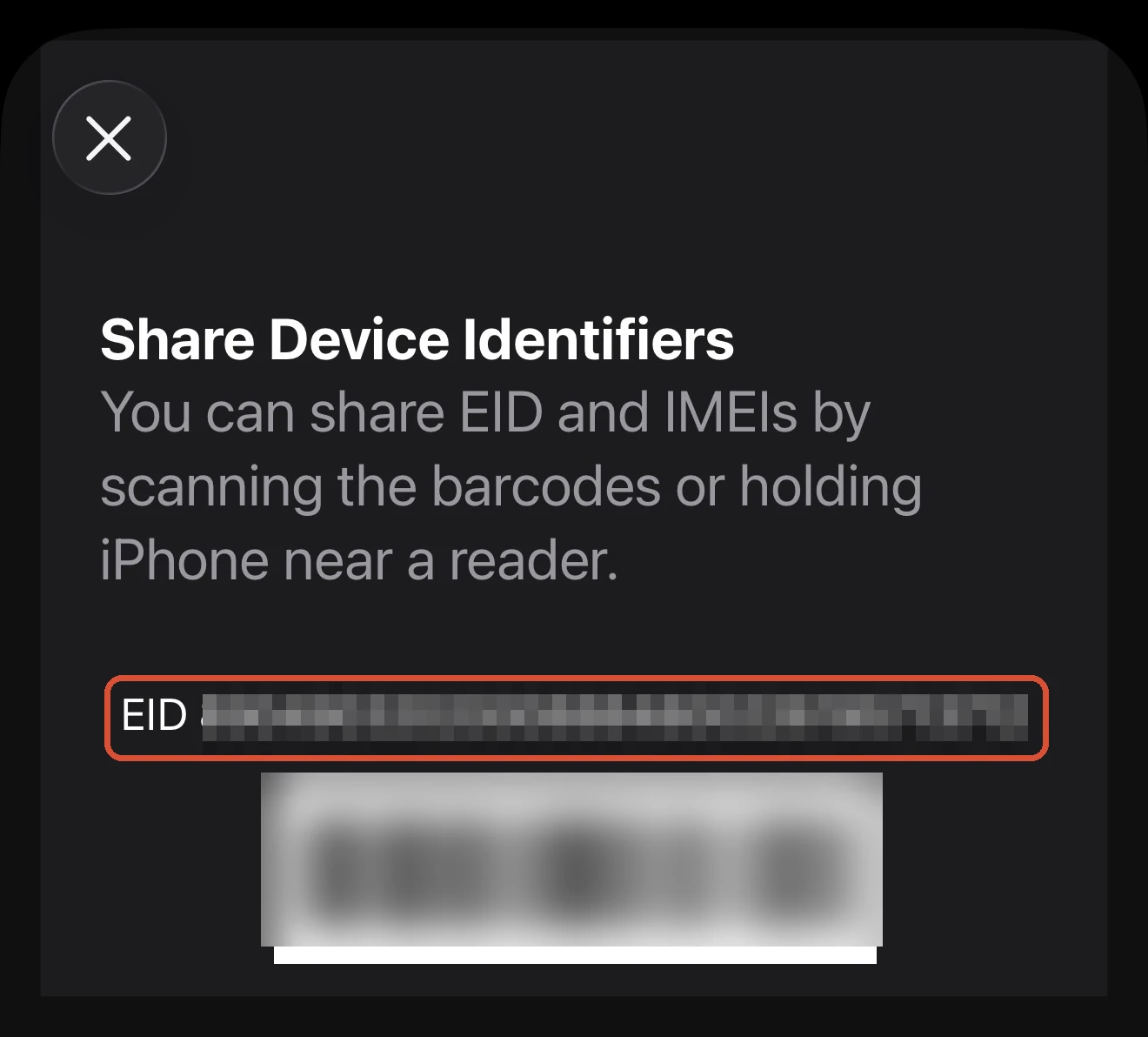
Most phones from roughly 2019 onward do. iPhones from the XS and later, recent Pixels, and recent Samsung Galaxy S and Note models all handle it. To check for certain, open your dialler and type *#06#. If an EID number appears alongside the IMEI, your phone has eSIM hardware.
2. Is your phone carrier-unlocked?
A phone bought outright is almost always unlocked. A phone bought on a contract or instalment plan may still be locked to that network, sometimes for years, even after the phone is paid off. A locked phone will refuse a travel eSIM. If you are not sure, your home carrier can tell you, and can usually unlock it for free once the contract terms are met.
One quiet trap: some newer US iPhones are eSIM-only, with no physical SIM tray at all. That is fine for travel eSIMs. It just means you cannot fall back to a plastic local SIM if you ever want to.
eSIM, roaming, or a local SIM?
An eSIM is not automatically the cheapest option. A local physical SIM bought at your destination is often still cheaper per gigabyte, especially on a long stay. What an eSIM buys you is not having to solve a connectivity problem in an unfamiliar airport at midnight, which for most trips is worth more than the price gap.
Roaming on your home plan is the most expensive of the three in most cases, and the one that produces surprise bills. We break down the actual cost maths, with worked examples by trip length, in our guide to eSIM vs roaming vs local SIM.
What eSIMs are good at, and what they are not
Good for
- Landing with data already working
- Keeping your home number and apps live
- Short and medium trips where convenience beats a few pounds
- Multi-country trips, using a regional plan
Less good for
- Rock-bottom cost on a long stay (a local SIM usually wins)
- Getting a local phone number for calls and texts (most are data-only)
- Older or carrier-locked phones
Installing one takes five minutes
The mechanics are deliberately boring: buy the plan, install it at home over wifi, switch the line on when you land. The menus differ by phone, which is why we keep a walkthrough for each: the iPhone install guide covers the QR and app methods plus the carrier-lock check, and the Android guide handles the Pixel and Samsung menu differences and the occasional APN quirk. Both end with the same three landing toggles, and both warn you off the one destructive mistake, deleting a profile to troubleshoot it.
Ready to choose one?
If your phone passed both checks, the next question is which provider, and that genuinely depends on where you are going, because each eSIM company resells a different local network in each country. Our ranked pick of the best travel eSIMs explains the trade-offs, and if you already know your destination, a country guide like the best eSIM for Japan gets specific about which network actually performs there.
And if you install one and it will not connect when you land, do not panic and do not delete it. Our eSIM troubleshooting checklist fixes the vast majority of cases in a couple of minutes.
The standard we hold every recommendation to, including what we test and what we only source, is set out in how we test.
FAQ
Is an eSIM safe?
Safer than plastic in the ways that matter: nothing to steal from a lost phone’s SIM tray, and profiles are locked to the device. The provider sees your data usage exactly as any carrier would; nothing new is exposed.
Does it drain battery?
No. An eSIM is the same radio hardware your physical SIM uses; running two active lines costs a little standby power, the eSIM itself costs nothing.
Can I move it to a new phone?
Usually not: most travel eSIM profiles are single-install, so a profile on your old phone does not transfer. Buy travel plans on the phone you are taking, and treat a mid-trip phone swap as a support-chat situation.
Does my WhatsApp number change?
No. WhatsApp stays registered to your home number, which stays live on your home SIM. The eSIM only carries data underneath it all.
Can I have an eSIM and my physical SIM active at the same time?
Yes, that is the standard travel setup: the physical SIM keeps your home number alive for calls and texts, the eSIM does local data. Both lines show in settings and you choose which one does what. Just keep data roaming off on the home line so it cannot bill you silently.
Do eSIMs work on tablets and smartwatches?
Cellular iPads take the same store eSIMs happily; watches are a different story, since most travel providers do not officially support watch installs. Check the provider’s device list before buying for anything that is not a phone.
What happens to my eSIM if my phone dies or is lost?
The eSIM goes down with the phone. Reinstalling on a replacement usually needs a fresh QR from support, which some providers issue free and some charge for. Buy from brands with an app login, and keep the confirmation email.