
Home»Money»Card declined abroad
Card Declined Abroad? Fix It From the Queue
By  Ignas Simkus|Last updated: 10 August 2026|How we test
A decline at a foreign till has a special quality of panic, and it is almost never what it feels like. Five causes explain nearly every one, and four of them are fixable from the queue in under two minutes. This is the triage I run, refined by the awkward pauses that built it.
Article Summary
- Check the app first: modern cards tell you the exact decline reason in real time
- The five causes: fraud flag, disabled region/online setting, limits, network mismatch, dead terminal
- The universal fallback: a second card on a different network
- Prevention: travel-aware banking apps beat travel notices
Step zero: the app knows
Before re-trying, open the card’s app. Fintech-generation cards, the ones our money hub recommends, are built to show the decline reason in the app as it happens, suspected fraud, limit reached, wrong PIN count, region blocked, behaviour both Revolut and Monzo document in their own help pages. That single screen converts guessing into fixing, and it is the strongest argument for travelling on an app-first card at all. Legacy bank card and no answer in the app? Assume a fraud flag and skip to the phone-approval step.
The five causes, in order of likelihood
- Fraud model flinch. A first transaction in a new country is exactly what stolen-card fraud looks like; our banking-abroad guide documents the pattern, and our own test where the payment sailed through but a security email followed. Approve the in-app prompt and retry.
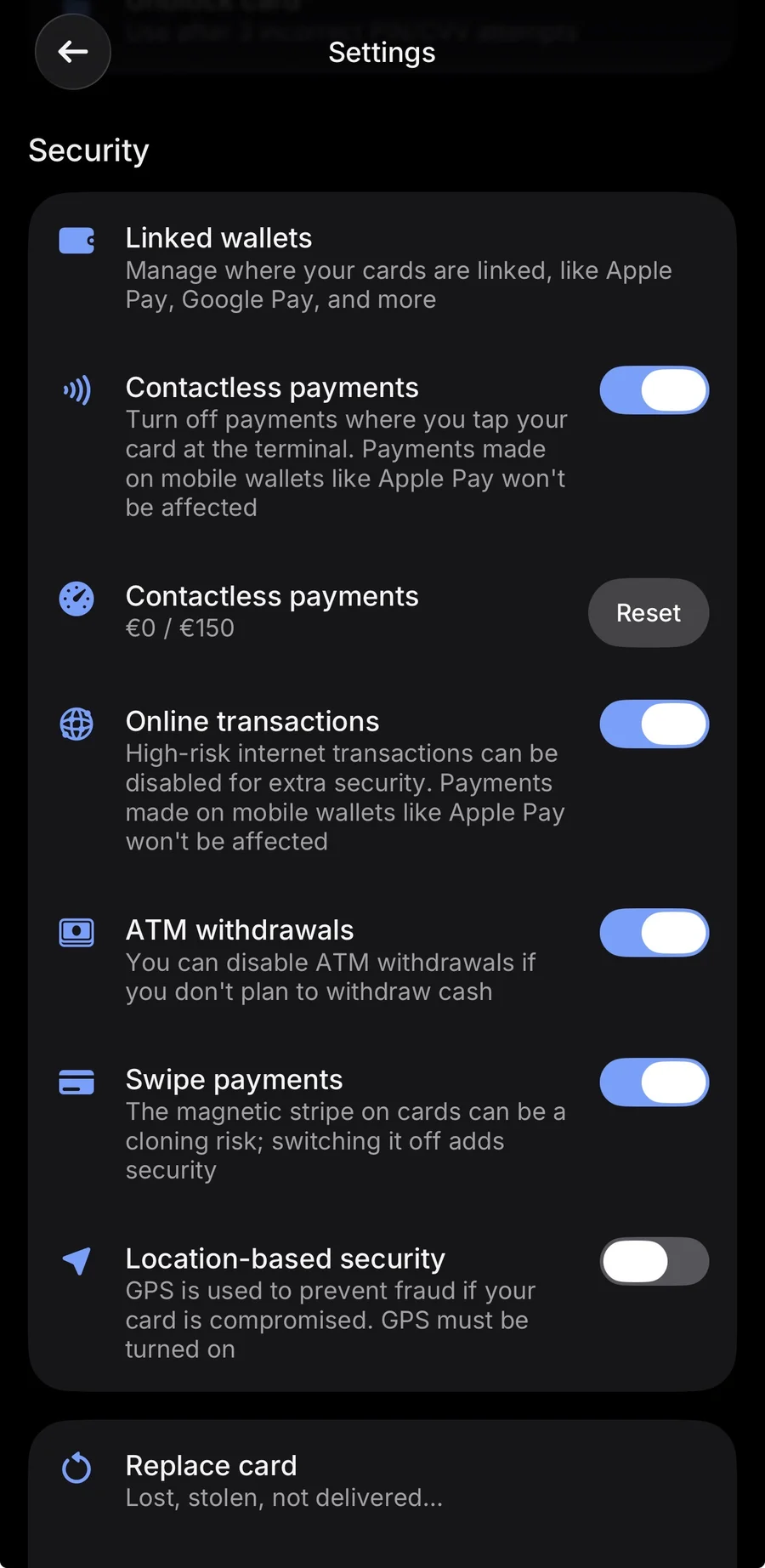
- A setting you forgot. Online payments off, magstripe disabled, a region toggle from a previous trip: thirty seconds in card settings.
- Limits. Daily spend or single-transaction ceilings, hit precisely when paying a hotel bill; raise temporarily in-app.
- Network mismatch. Some terminals and whole countries lean Visa or Mastercard; the fix is the two-network rule below.
- It is not you. Terminal connectivity fails constantly abroad; ask them to reboot it or pay another way.
The thirty-second counter script
While the app loads, work the terminal. Try the chip instead of the tap (or the reverse); contactless and inserted transactions ride different verification paths and one regularly succeeds where the other fails. Ask for a smaller amount; single-transaction ceilings decline quietly. Ask them to re-run it on the other terminal; abroad, “the machine is down” is a real answer wearing a decline costume. And if the screen offers your home currency mid-tap, refuse it; a confused DCC prompt aborts more transactions than anyone admits.
Online declines abroad: the 3-D Secure wrinkle
Web payments fail abroad for one extra reason shops never explain: strong customer authentication. European cards trigger a second factor on most online payments under the EU’s PSD2 rules, and that second factor is usually a push notification or an SMS to your home number. Travelling with the home SIM disabled, or with notifications silenced, turns every hotel-booking payment into a mystery decline. The fix stack: keep the home line alive for texts (the eSIM handles data), approve the push in the banking app, and where offered, move the second factor into an authenticator app before flying.
The two-network rule
Every fix on this page has a failure mode except one: a second card on a different network, from a different company, in a different pocket. Visa where Mastercard fails, a spare when an account is frozen, a backup when a card is swallowed. Ours is the cheapest insurance in the entire travel stack, two free fintech cards cover both networks without a fee between them.
When it really is the bank
If the app shows a compliance hold or the card is locked pending “verification”, you are in support territory: start the chat immediately, because these queues move in hours, not minutes. Meanwhile: pay from the second card, pull cash per the ATM guide if needed, and never let a hotel run the same failing card three times, repeated declines feed the fraud model you are trying to calm.
The pre-flight prevention list
- Open the card settings screen once. Online payments, contactless, ATM withdrawals: know what is on before a terminal finds out for you.
- Check expiry dates. The classic six-week trip with a five-week card.
- Make the limits fit hotel-bill reality. Daily and single-transaction ceilings are set for home life; a two-week bill settles abroad in one swipe.
- Carry two networks. One Visa, one Mastercard; both networks publish ATM locators (Visa’s and Mastercard’s), and the day one network hiccups nationally, the other is your afternoon.
- Fix 2FA before it fixes you. Home SIM stays live for texts, authenticator app where the bank allows it.
- Know your bank’s decline surface. App-first cards show the reason in real time; if yours does not, store the international support number somewhere that is not behind the card that just declined.
Travel-aware cards make bank travel notices obsolete (their fraud models read location), though legacy banks still appreciate one where offered. Then stop worrying: with two networks in your pocket and the triage above, a declined card is a ninety-second story, not a ruined evening.
FAQ
Does a declined card hurt my credit score?
No. A point-of-sale decline is a transaction event, not a credit event; nothing is reported anywhere. The only casualty is the queue behind you.
Why does my card work in shops but fail online abroad?
Different rails. In-person runs on the chip; online runs address checks and 3-D Secure, which travel confuses. Billing-address mismatches and SMS codes landing on an unreachable home number are the usual culprits, and both are fixable before the flight.
Should I carry both Visa and Mastercard?
If you can, yes. Acceptance gaps are rare but real, a terminal mid-outage, a country quirk, and the two-network rule turns a trip-stopper into a shrug.