


Is Hotel Wi-Fi Safe in 2026? An Honest Threat Model
By  Ignas Simkus|Last updated: 22 July 2026|How we test
The classic horror story, a hacker reading your passwords off the lobby wifi, is mostly dead: HTTPS killed it. I spent years inside the VPN industry watching that story get oversold, so consider this the version without the fear marketing. What replaced it is quieter and more interesting. Here is what can actually go wrong on hotel wifi in 2026, and the short list of habits that close it down.
Article Summary
- Mostly safe: HTTPS encrypts nearly everything you do, on any wifi
- Real risks: fake “evil twin” networks, phishing captive portals, ancient unpatched routers
- Best habits: confirm the network name at the desk, never install anything a portal asks for
- The VPN’s role: real but narrower than advertised; genuinely useful on networks you can’t judge
What changed since the scare stories were written
A decade ago, open wifi meant anyone on the network could read your unencrypted traffic. Then the web moved to HTTPS: the padlock, encryption between your browser and the site, on by default nearly everywhere that matters. Banking apps and major websites also pin certificates and refuse downgraded connections. The result, which the FTC’s own public wifi guidance now reflects, is that ordinary browsing on public wifi is dramatically safer than the folk wisdom suggests: someone on the same network sees which domains you visit, but not what you do there.
So the honest headline: your password is not being harvested by the guy with the laptop in the lobby. The remaining risks are more specific, and worth taking seriously precisely because they are real.
The four things that can still go wrong
Evil twins. Anyone can broadcast a network called “Hotel_Guest_WiFi” from a phone in the same lobby. Join it and your traffic routes through them: HTTPS still protects content, but they control DNS, can serve you fake login portals, and see your metadata. The defence costs nothing: confirm the exact network name at the desk, and distrust any network that reappears without the password it had yesterday.
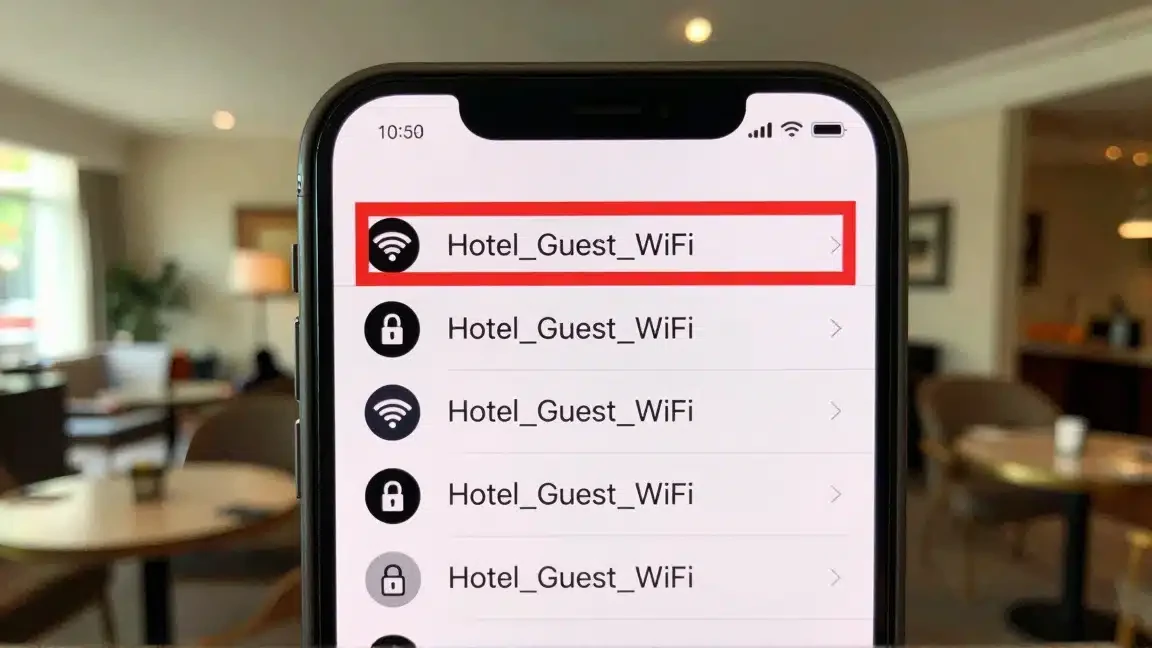
Captive portal phishing. The login page itself is the attack surface: portals that demand an app install, a “security certificate”, or card details for “verification” are how travellers actually get compromised. A legitimate portal wants a room number and a name. Anything executable is a no.
The router itself. Hotel access points run old firmware for years, and a compromised router sits in the perfect position to tamper with DNS. Hotels are worth attacking, too: Verizon’s 2026 DBIR counts 319 incidents and 250 confirmed breaches in accommodation, about 1% of everything it analysed, not the “13% of attacks” figure that floats around this topic, and hotels stay a steady target because the networks are big, transient and full of business travellers. You cannot patch the hotel’s router; you can make its position worthless, which is the one place a VPN earns its keep on this page.
Data collection by design. The legal one: hotel networks log devices and sites for marketing and compliance, more aggressively in some countries than others. Not dangerous, just worth knowing when deciding what to do on a network you did not choose.
Where a VPN fits, honestly
A VPN wraps all traffic, including DNS, in a tunnel to the provider’s server, which converts every risk above from “possible” to “pointless”: the evil twin sees noise, the compromised router tampers with nothing, the logging sees one connection. That is a real benefit on networks you cannot judge, which is what travel consists of. What a VPN does not do is add much on connections that are already trustworthy, and it will not protect you from installing something a fake portal asked you to install. Tool, not talisman, though ours pass the audit: none of the three VPNs we ran through extended DNS-leak tests leaked a single resolver. Our travel VPN ranking is built on this framing, and the same tunnel is what solves the foreign-IP banking problem as a side effect.
One habit beats the VPN for sensitive sessions anyway: do banking on mobile data instead. Cellular is encrypted at the link layer and bypasses the hotel network entirely; with a travel eSIM the cost of that habit rounds to zero.
The traveller’s wifi routine
| Habit | Closes down |
|---|---|
| Confirm the exact network name at check-in | Evil twins |
| Never install anything a portal requests | Portal phishing, the real attack |
| Keep OS and browser updated | The exploits everything else depends on |
| Sensitive logins on mobile data or VPN | Router compromise, metadata logging |
| Forget the network on checkout | Auto-rejoining a spoofed twin next trip |
Airport, cafe, Airbnb: same rules?
Mostly, with different emphasis. Airport wifi concentrates the evil-twin risk, because a terminal full of distracted people auto-joining anything named “Free_Airport_WiFi” is the attack’s natural habitat; take the extra three seconds to select the network the signage actually names. Cafe wifi is where the forget-the-network habit matters most, since it is the network type you rejoin most often across a trip, and a spoofed rejoin months later inherits your device’s automatic trust.
Airbnb and guesthouse wifi earns its own paragraph: the router is consumer-grade, administered by nobody, and its admin password is frequently still the default, which puts DNS tampering within reach of any previous guest who cared to try. Nothing there changes the playbook, it just weights it: this is the network type where doing sensitive logins on mobile data or through the tunnel stops being caution and starts being the obvious move. A travel eSIM with a few spare gigabytes makes that decision free.
The verdict
Hotel wifi in 2026 is safe enough for browsing, streaming and email out of the box, thanks to HTTPS rather than the hotel. It stays risky at the edges: fake networks, fake portals, old hardware. The habits above cost five minutes total; a VPN adds a floor under all of it and unlocks the home-catalogue streaming and banking-access problems while it is there. That combination, habits plus tunnel, is the whole answer.
FAQ
Is hotel wifi safe for online banking?
Not bare: banking on a shared network is precisely the scenario interception and evil-twin attacks exist for. Do money things on mobile data or through a VPN; save the hotel wifi for streaming.
Can the hotel see what I browse?
The network operator sees the domains you visit unless a VPN is on; page contents are mostly protected by HTTPS these days. The realistic worry is logging and injected portal pages, not a hacker in a hoodie by the ice machine.
Does the wifi password mean the network is secure?
No. The lobby password only gates entry; every guest still shares one network. A password-protected hotel network is exactly as dangerous as an open one once an attacker checks in.